
WordPress Isn’t the Problem, Poor Architecture Is: How to Engineer WordPress That Scales
A free theme and dozens of plugins is not the same as an engineered WordPress platform. Here is how scalable WordPress architecture works, and the questions to ask before you build.
 Hamza UmarHead of Development · Founder, OPT Tech Solution
WordPress isn’t the problem. Poor architecture is. As a full stack web developer and Head of Development, I have seen the difference between a WordPress website that is simply assembled and one that is actually engineered. Same software, different engineering, completely different results.
Many people still think WordPress is only for small websites, blogs or basic business pages. Then they see a slow, fragile site built on a free theme and thirty plugins, and they blame the CMS. But WordPress runs some of the busiest websites on the internet. The difference is not the platform. It is how the platform is designed, built and maintained.
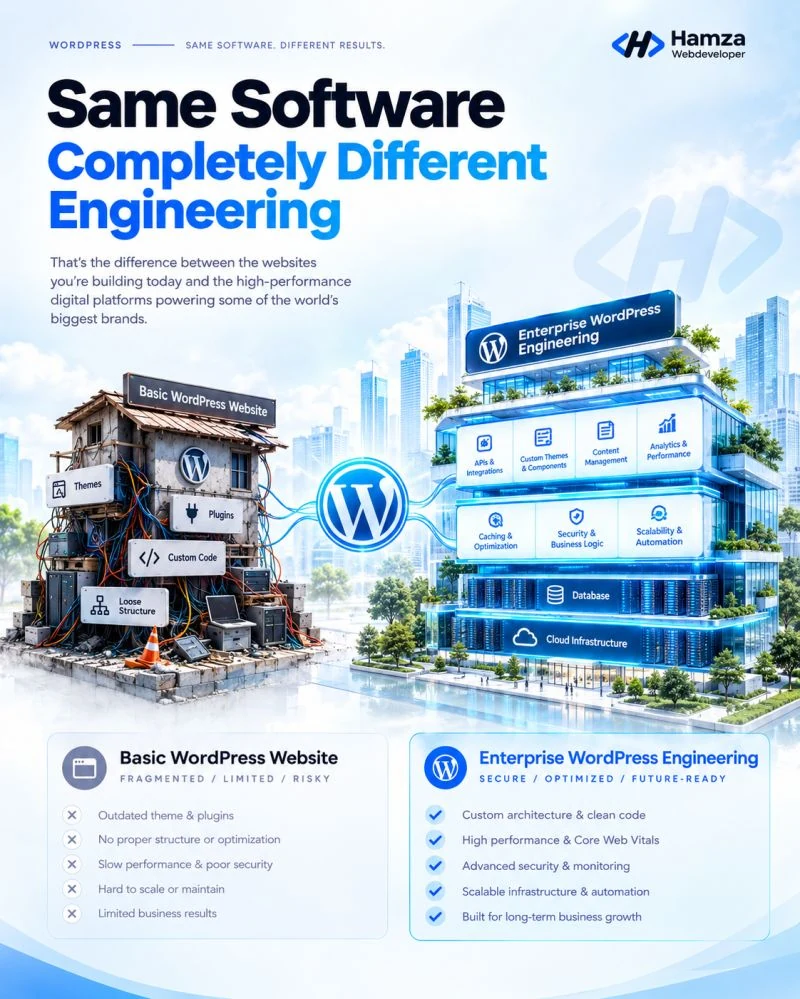
Assembled vs engineered WordPress
An assembled WordPress site is put together from whatever is available: a theme bought for its demo, a page builder, and a plugin for every feature. It looks fine on launch day. Six months later it is slow, updates break layouts, and nobody can explain why a form stopped sending emails.
An engineered WordPress site starts with questions: what must this platform do in two years, how much traffic and content will it hold, who edits it, what does it connect to, and what happens if something fails? The answers shape the architecture before a single page is designed.
| Assembled WordPress | Engineered WordPress | |
|---|---|---|
| Foundation | Generic theme and page builder | Custom theme or block system built for the content |
| Features | A plugin for everything | Custom code where it matters, a few trusted plugins |
| Data | Everything stuffed into posts and pages | Custom post types, taxonomies and fields with a clear model |
| Speed | Heavy pages, slow admin | Lean code, layered caching, Core Web Vitals in the green |
| Security | Depends on luck and updates | Hardened server, least privilege, monitoring and backups |
| Growth | Every new feature is risky | New features plug into a stable structure |
What WordPress architecture actually means
Architecture is the set of decisions that sit underneath the design. On every serious WordPress build I look at nine areas.
1. Custom development
Instead of bending a multipurpose theme to fit, the theme is built for your content: your layouts, your components, nothing extra. Editors get blocks or fields that match how they actually work, so they can update the site without breaking it. See how I approach this in custom WordPress development.
2. Scalable architecture
Scalability means the site keeps working as content, traffic and features grow. That comes from separating concerns: content in the database, business logic in a plugin, presentation in the theme. When each layer has one job, you can change one without breaking the others, and you can move heavy work (imports, reports, emails) to background queues instead of slowing page loads.
3. Clean and maintainable code
WordPress coding standards, version control, code review and a staging site are not luxuries. They are what lets a second developer understand the project, and what lets you fix a bug on a Friday without fear. Clean code is also the cheapest code to own: every hour saved on maintenance is budget for growth.
4. Performance optimization
Fast WordPress is designed, not bolted on with a plugin at the end. It means lean templates, only loading scripts where they are needed, optimized images, a page cache, an object cache such as Redis for busy sites, and a CDN in front. I cover the full checklist in how to speed up a WordPress website, and it is the core of my speed and technical SEO work.
5. Security
Most WordPress hacks come from outdated or nulled plugins, weak passwords and loose server permissions, not from WordPress core. Engineered builds reduce the attack surface: fewer plugins, least privilege user roles, two factor login, a firewall, hardened file permissions, off site backups and monitoring. If a site has already been compromised, my hacked WordPress recovery guide walks through the cleanup, and malware removal and hardening covers it as a service.
6. APIs and third party integrations
Modern websites rarely stand alone. They talk to CRMs, payment gateways, ERPs, WhatsApp, booking systems and AI services. Doing this well means using the WordPress REST API or custom endpoints, handling failures and retries, keeping secrets out of the code, and logging what happens, so one slow external service never takes your whole site down.
7. Custom business logic
When WordPress has to follow your rules (pricing that depends on location, approval workflows, member access, lead routing), that logic belongs in a dedicated, tested plugin. Not scattered across theme files and page builder widgets. For larger systems, WordPress can sit next to a custom application and share data through APIs.
8. Proper database structure
Custom post types, taxonomies and well planned meta fields keep data queryable. Large datasets that do not fit the post model deserve their own tables with proper indexes. And plugins you removed years ago should not still be loading options on every request. A tidy database is one of the most underrated performance upgrades.
9. Long term maintainability
A website is a product, not a one time project. Documentation, update routines, automated backups, uptime monitoring, staging before production and clear ownership of hosting all decide whether the site is still healthy in three years. This is where good hosting and DevOps pays for itself.
The right question to ask
From my experience, the real question should not be “Can WordPress handle this?” It should be “How should we architect WordPress to handle this?”
That shift changes the whole conversation. Instead of comparing platforms on features alone, you plan for traffic, content volume, integrations, editors, security and budget over time. Sometimes the answer is still a different platform, and I compare the options honestly in WordPress vs Webflow vs Shopify vs custom code. But far more often, WordPress is the right foundation and the architecture is what was missing.
A quick WordPress architecture checklist
Before your next WordPress project, or before you decide your current site is beyond saving, check these points:
- Is the theme built for your content, or adapted from a generic demo?
- Does every plugin earn its place, and is each one actively maintained?
- Is business logic in a dedicated plugin with version control?
- Are there custom post types and fields for structured content?
- Is there page caching, object caching for busy sites, and a CDN?
- Do Core Web Vitals pass on mobile, not just on desktop?
- Are backups automatic, stored off site and tested?
- Is there a staging site, and do changes go through it first?
- Are integrations handled through APIs with error handling and logs?
- Is someone clearly responsible for updates, security and monitoring?
If several answers are “no”, the problem is probably not WordPress. It is the way the site was put together, and that can be fixed.
What does engineered WordPress cost?
An engineered build costs more on day one than installing a theme, but it is cheaper to run, faster to extend and far less likely to need a full rebuild. For typical budgets see my guide to how much a website costs in 2026, or compare packages on the pricing page.
WordPress gives you the foundation
WordPress gives you the foundation. Good engineering determines how far you can take it. If your website feels slow, fragile or hard to grow, or you are planning something bigger and want it built properly from the start, tell me what you are building and I will suggest the right architecture for it.
Frequently asked questions
Can WordPress handle a large or enterprise website?
Yes. WordPress powers news publishers, universities, government portals and large ecommerce stores. What decides whether it copes is the architecture: custom code instead of plugin stacks, a clean database structure, layered caching, a CDN, proper hosting and a deployment process. The software is the same; the engineering is what changes.
How many plugins are too many for WordPress?
There is no magic number. Ten badly written plugins can slow a site more than forty good ones. Ask what each plugin loads on every page, whether it is maintained, and whether the same result could be a few lines of custom code. On engineered builds I keep plugins to the ones that earn their place.
Is custom WordPress development more expensive than using a theme?
It costs more at the start, but usually less over the life of the website. A theme plus many plugins is cheap to launch and expensive to maintain: conflicts, slow pages, security updates and rebuilds. Custom architecture is easier to extend, faster and safer, so you pay for it once instead of repeatedly.
When should I choose headless WordPress?
Headless WordPress makes sense when the same content feeds several front ends (a website, an app, a kiosk) or when the front end needs a JavaScript framework such as Next.js. For most business websites a well built traditional WordPress theme is faster to deliver and easier to run.
How do I know if my current WordPress site has architecture problems?
Common signs: pages that get slower every month, updates that break things, a database full of leftover plugin tables, admin pages that take seconds to load, features nobody dares to touch, and repeated security issues. A technical audit of code, plugins, database and hosting shows where the real bottleneck is.
Head of Development at Bright Ideas Communications and founder of OPT Tech Solution. 6+ years, 1000+ websites and 250+ clients across 20+ countries: WordPress, Laravel, MERN, security and AI.
Get a fixed quote, scope and timeline, usually within an hour.
More WordPress articles.
All articles
How to Speed Up a WordPress Website: 15 Fixes for a 90+ PageSpeed Score
Slow sites lose visitors and rankings. Here are the 15 fixes I use to take WordPress sites from sluggish to a 90+ PageSpeed score.
Read article
PHP2Shell Vulnerability: Is Your WordPress Website at Risk? (CVE-2026-109618 and CVE-2026-109619)
Last updated: October 23, 2026 On October 21, 2026, the PHP team released emergency security updates for two critical flaws now known as PHP2Shell. The flaws are tracked as CVE-2026-109618 and CVE-2026-109619, and each one scores 9.2 out of 10 on the CVSS v4.0 scale. This is not a WordPress plugin bug. The problem sits […]
Read article
UAE Clinic Website Checklist 2026: Bookings, WhatsApp, DHA Rules
A practical 2026 checklist for clinic websites in Dubai, Abu Dhabi and the wider UAE: licence details, DHA friendly copy, online booking, WhatsApp, patient data and Arabic SEO.
Read article